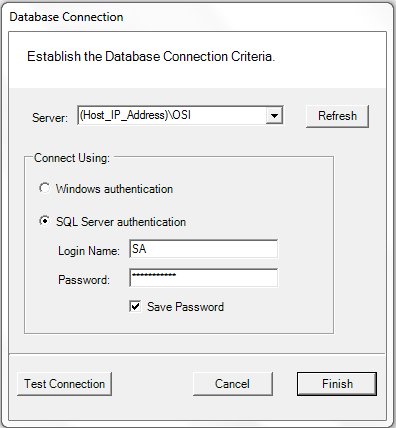
When you first launch the Best Omnilock WAMS WiQ client software you will have to setup the database connection to the host machine.
The following direction will work for most installations. If you have a custom installation you will have to tweak the settings.
1. Enter the IP address or host name of the server of the host machine followed by \OSI (example: myserver\osi)
2. Choose the database authentication that has been setup for you; WIndows Authentication or SQL Server Authentication. If use SQL authentication make sure to click SAVE password.
Note: This is not the user name and password to get into the software. This is a separate one time authentication that was setup by COR Security.
3.. Click Test Connection. You should get a "Valid" response. If not check your settings again. If you still don't have a valid connection then verify that firewall ports have been opened on the host machine.
4. Click Finish